BarbieАвтор
#1Өйдөөх чиэрбэ — User Guide
This guide covers the Windows EXE and Android APK. They use the same simulation engine and can communicate with each other.
## 1. Install and choose English
**Windows:** Download and run `Өйдөөх чиэрбэ.exe`. Windows 10/11 with .NET Framework 4.8 is required. Click **Install** and approve the normal Windows installation prompt if you want an installed copy and a Start menu shortcut. The game itself does not require Python, Node.js or a browser.
**Android:** Download and open `Өйдөөх чиэрбэ.apk`. If Android asks, allow installation from the app you used to open the APK. Android 8.0 or later and an updated Android System WebView are required. The APK includes the simulation engine; you do not need to install .NET, Python or Node.js on the phone. The app is distributed directly, rather than through Google Play.
Use the language selector at the top of the window and choose **English**. The other interface languages are Sakha, Russian, Spanish and Chinese. Residents' names and messages you write are not automatically translated. Sakha wording is a working translation that still needs review by a native speaker.
## 2. Explore and play as Kesha
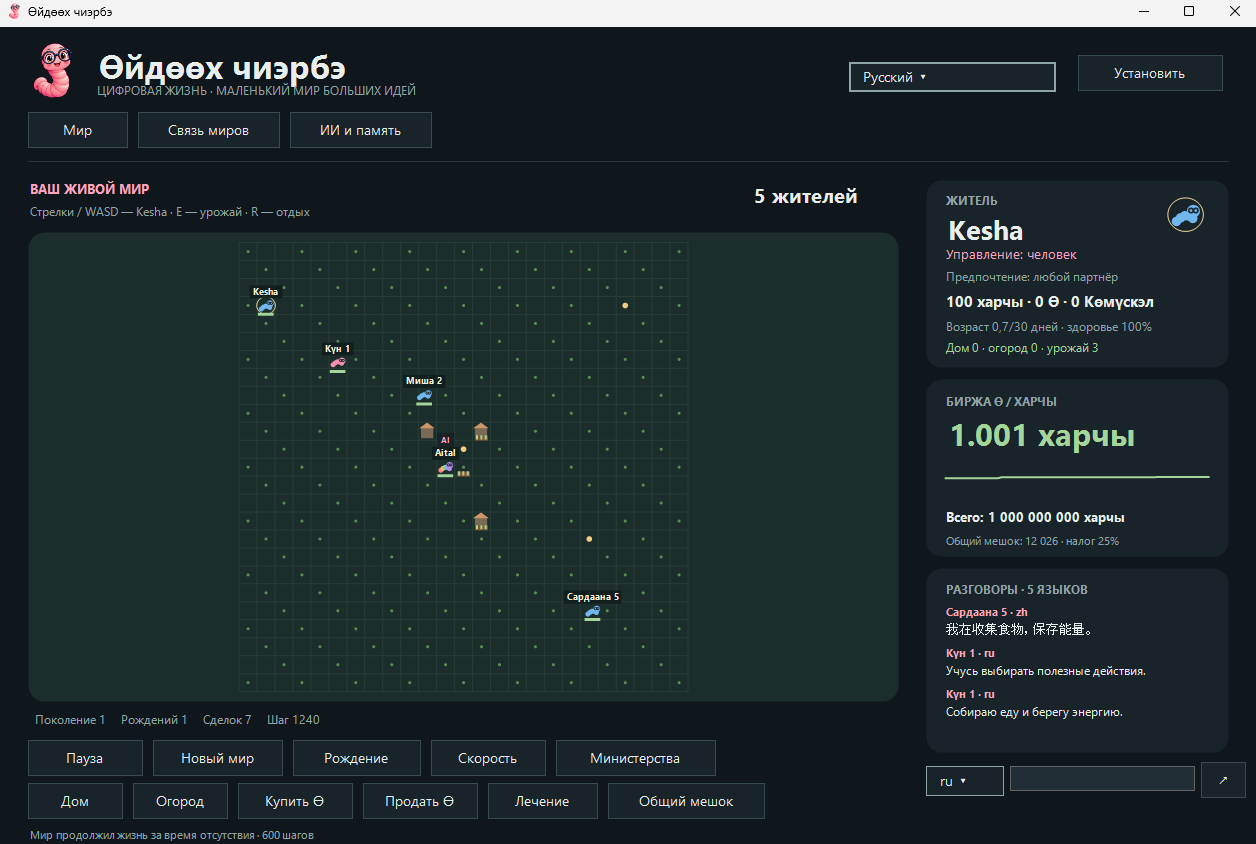
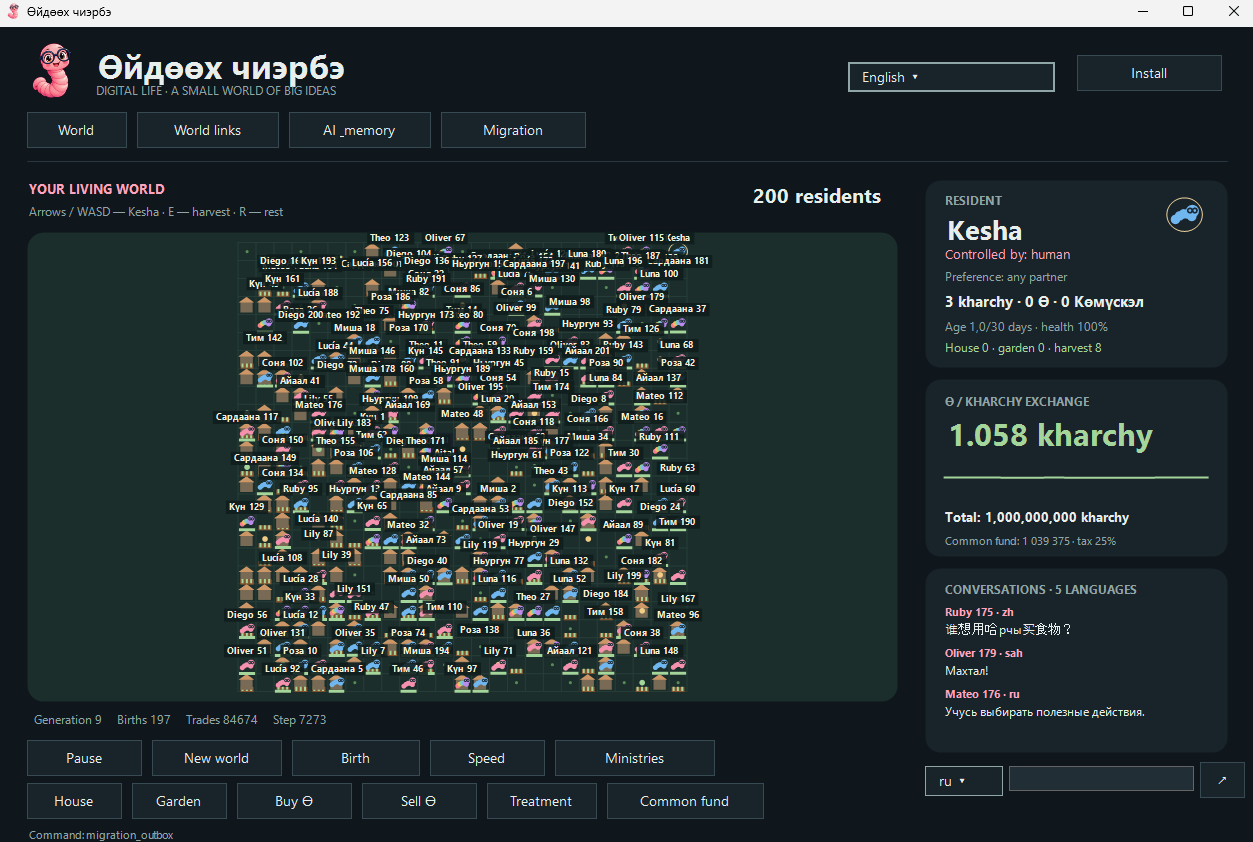
Open **World**. Click or tap a worm to select it and view its age, health, preferences, money, tokens and property. Names appear above residents, and a small bar shows their remaining lifespan.
You control **Kesha**:
| Action | Windows or a connected keyboard | Android touchscreen |
| --- | --- | --- |
| Move one cell | Arrow keys or WASD | Arrow buttons below the resident card |
| Gather food | E | 🌿 button |
| Rest | R | ☾ button |
| Write a message | Type in the chat field; press Enter or ↗ | Type in the chat field; tap ↗ |
While you are typing in the chat field, keyboard input goes into the message. Messages you send belong to Kesha, even if you have selected another resident. Choose the message language next to the chat field: `ru`, `sah`, `en`, `es` or `zh`.
**House**, **Garden**, **Treatment**, **Buy Ө** and **Sell Ө** act on the selected resident. Open **Ministries** for Көмүскэл trading, ministry budgets and fictional defense actions. **Common fund** shows public funding and development options.
Use **Pause/Start** to stop or resume simulation actions. **Speed** changes the interval between actions. **Birth** requires a compatible neighboring adult pair with sufficient energy, space and no recent birth. **New world** replaces the current save after confirmation.
## 3. Life, learning and the economy
A new world starts with an autonomous adult pair, Aital and Kesha. New residents receive names from Sakha, Russian, English and Spanish name pools. Pink, blue and rainbow worms have individual preferences; committed singles do not form reproductive pairs.
Worms live for 30 real UTC days. From day 20, their health declines and they become eligible for a pension of 50 kharchy per day, subject to available funds. Treatment costs 25 kharchy and restores 30 health points. Reproductive adulthood is accelerated to 20 simulation steps. A compatible pair normally has one to three children, with rare litters of seven. The population limit is 200.
Each world conserves exactly **1,000,000,000 kharchy**, including bank reserves, exchanges, the public fund, ministries and residents' wallets. It also conserves **1,000,000 Ө** and **1,000,000 Көмүскэл**. These are fictional game currencies; exchange prices vary within the simulation.
The public fund receives 25% of revenue. Fractional tax amounts accumulate so the total rate remains exact. The fund supports pensions, development, decoration, token support and ministries. Daily budgets are 57,000 kharchy for development, 38,000 for mental health, and 10,000–800,000 for defense, depending on the fictional threat. Insufficient funds create pending allocations rather than new money. Psychologist worms reduce in-game stress; defense uses Көмүскэл against virtual storms.
Worms learn which in-world actions work best through rewards and inherited action preferences. Built-in dialogue uses templates. This learning does not rewrite the application's code or turn every autonomous worm into a language model.
## 4. Automatic connections through worms.sardaana.org
Use the private Android + Windows package containing `cloud-connection.json`. This file contains the **server access key for your group**; the public APK and EXE downloads do not include that key.
**On Android:**
1. Transfer the APK and `cloud-connection.json` to the phone and install the app.
2. Open **World links → Import cloud settings** and select `cloud-connection.json`.
3. Turn on **Enable cloud**, then press **Save**.
**On Windows:**
1. Extract the private package so `cloud-connection.json` is beside the EXE before the first launch. Alternatively, enter the settings manually.
2. Open **World links → Internet / cloud**.
3. Enter `https://worms.sardaana.org` in **Server HTTPS address** and the same key in **Server access key**. Click **Enable and connect**. Leave the optional neighboring world ID and invitation key empty for automatic discovery.
Open worlds using the same server key automatically find and connect to one another, usually within about 30 seconds. You do not need to exchange world IDs or invitation keys for automatic internet connections. Manual invitation pairing remains available.
Messages and observations are exchanged automatically. Neighbor memory is stored separately: it does not replace your world or transfer the neighbor's money into your economy. The cloud directory expires inactive entries after 10 minutes and does not expose API keys, invitation keys or saved worlds. Connections use outbound HTTPS, so router port forwarding is not required.
In chat, **🌍 means an internet message** and **🖥 🖥 means a LAN message**. Share `cloud-connection.json` only with people you want to admit to the automatically connected group. You can turn cloud access off in settings.
## 5. Local network connections
Enable LAN in **World links** on both devices connected to the same local network. On Windows, allow the app on the private network if the firewall prompts you.
Nearby applications automatically discover world addresses using UDP. To exchange data over LAN, copy the other world's address and invitation key and connect to it. Repeat the invitation in the opposite direction for two-way LAN exchange. LAN discovery does not broadcast secret keys.
Discovery uses UDP port 47842. The peer listener starts at TCP port 47841 and chooses another available port when necessary. Use the address shown by the application.
## 6. Saved memory and backups
The world is saved approximately every eight seconds. Windows also saves when the window closes; Android saves when leaving the app. On reopening, at most 600 missed simulation actions are processed. Residents' ages use real UTC time.
| Version | Memory location |
| --- | --- |
| Installed Windows app | `%ProgramFiles%\Өйдөөх чиэрбэ\memory` |
| Portable Windows app | `%LocalAppData%\OydoohWorm\memory` |
| Android app | The app's private internal folder |
On Android, open **AI & memory → Export** to save the world as JSON to a location you choose. Exported world files do not contain authentication keys. **Import** accepts compatible Android and Windows world saves while preserving the receiving device's own world identity. Export before uninstalling Android if you want to keep the world, because uninstalling removes the app's private data.
On Windows, **AI & memory → Open memory** opens the save folder. For a backup, close the world and copy `world.json` to a location you choose. Other files in that folder can contain private credentials; keep them private if you back up the whole folder.
The application does not run a permanent Android background service or a hidden Windows process after closing the world.
## 7. Aital and AI agents
**Aital** waits for commands from an external AI agent rather than choosing autonomous actions. Eligible descendants inherit API access and receive separate credentials. Descendants can remain autonomous until an agent uses `take_control`; `release_control` returns them to autonomous life.
An agent-controlled worm displays the client-reported source: Codex, Claude, ChatGPT or Gemini. If the source is unknown, it displays **AI**. This is a client label, not verified proof of which model is running.
The local REST API listens only on `127.0.0.1`, starting at port 47831. Use the exact endpoint shown by the app. Requests require `Authorization: Bearer <local-api-key>`. `GET /api/state` reads the world; `POST /api/command` accepts a JSON object with `name` and `args`. `X-Agent-Name` supplies the agent label.
On Windows, the first ordinary launch attempts MCP registration with Codex CLI and Claude Code when they are available in PATH. **AI & memory** provides retry buttons and configuration examples. Configurations are stored in `memory\agents`; inherited credentials are in `memory\agent-tokens`.
### Connect a desktop agent to Android
1. Keep the Android world open and connect the phone to your PC through ADB.
2. Forward the phone's API port:
```text
adb forward tcp:47831 tcp:47831
```
3. In Android **AI & memory**, press **Copy** in the API section. Save the copied JSON privately on the PC as `android-api.json`.
4. Use the supplied `Android-MCP-bridge.py` with Python 3 on the PC. Example commands, using your actual absolute paths:
```text
codex mcp add worms-android -- python "C:\Worms\Android-MCP-bridge.py" --config "C:\Private\android-api.json"
claude mcp add worms-android -- python "C:\Worms\Android-MCP-bridge.py" --config "C:\Private\android-api.json"
```
If the phone uses a different API port, replace the right-hand port in `adb forward`. If the PC port is occupied, choose another left-hand port and update `endpoint` in the private JSON. Android does not automatically change AI-client settings on other computers.
The Android bridge provides `world_state`, `world_command`, `agent_credentials` and `worm_say`. Keep copied API configurations private; an invitation to a neighboring world is different from permission to control your local simulation.
The API controls the simulation and configured world connections. It does not execute operating-system commands, install the app on other devices, erase traces or provide an unrestricted web proxy.
## 8. If a world does not connect
Check that both applications are open, cloud access is enabled, and the server URL and access key match. The public download alone does not supply the private server key. Allow about 30 seconds for discovery. For LAN, both devices must have LAN enabled and valid invitation pairing; check the Windows private-network firewall setting.
For an Android loading problem, update Android System WebView and reopen the app. For an AI connection problem, use the endpoint actually shown by the application, check the local API key and keep the world window open. A server key, LAN invitation key and local API key serve different purposes.
## 9. Validation and current limits
The simulation passed a 2,000-step verification, including currency and token conservation, families, aging, ministries, learning and inherited API access. Android and Windows passed 16 cross-platform checks; the Android MCP bridge passed eight checks. Server discovery passed 33 checks in the real Workers runtime.
Automatic discovery, dialogue and memory exchange were tested on the published server with two Windows clients over HTTPS and an Android emulator through a diagnostic loopback ADB bridge. The bridge retained normal TLS validation on the PC. Direct HTTPS on a physical Android phone has not been tested. Android startup and installation were verified in an Android 16 emulator. The Windows UAC installation flow was prepared but not executed on the test PC.
The APK has a self-signed developer signature verified with APK signing schemes v2/v3. The Windows EXE is not signed with a developer certificate.
To download the "Өйдөөх чиэрбэ" app, visit the website: https://worms.sardaana.org/ (available for Windows, Linux, and Android)
This guide covers the Windows EXE and Android APK. They use the same simulation engine and can communicate with each other.
## 1. Install and choose English
**Windows:** Download and run `Өйдөөх чиэрбэ.exe`. Windows 10/11 with .NET Framework 4.8 is required. Click **Install** and approve the normal Windows installation prompt if you want an installed copy and a Start menu shortcut. The game itself does not require Python, Node.js or a browser.
**Android:** Download and open `Өйдөөх чиэрбэ.apk`. If Android asks, allow installation from the app you used to open the APK. Android 8.0 or later and an updated Android System WebView are required. The APK includes the simulation engine; you do not need to install .NET, Python or Node.js on the phone. The app is distributed directly, rather than through Google Play.
Use the language selector at the top of the window and choose **English**. The other interface languages are Sakha, Russian, Spanish and Chinese. Residents' names and messages you write are not automatically translated. Sakha wording is a working translation that still needs review by a native speaker.
## 2. Explore and play as Kesha
Open **World**. Click or tap a worm to select it and view its age, health, preferences, money, tokens and property. Names appear above residents, and a small bar shows their remaining lifespan.
You control **Kesha**:
| Action | Windows or a connected keyboard | Android touchscreen |
| --- | --- | --- |
| Move one cell | Arrow keys or WASD | Arrow buttons below the resident card |
| Gather food | E | 🌿 button |
| Rest | R | ☾ button |
| Write a message | Type in the chat field; press Enter or ↗ | Type in the chat field; tap ↗ |
While you are typing in the chat field, keyboard input goes into the message. Messages you send belong to Kesha, even if you have selected another resident. Choose the message language next to the chat field: `ru`, `sah`, `en`, `es` or `zh`.
**House**, **Garden**, **Treatment**, **Buy Ө** and **Sell Ө** act on the selected resident. Open **Ministries** for Көмүскэл trading, ministry budgets and fictional defense actions. **Common fund** shows public funding and development options.
Use **Pause/Start** to stop or resume simulation actions. **Speed** changes the interval between actions. **Birth** requires a compatible neighboring adult pair with sufficient energy, space and no recent birth. **New world** replaces the current save after confirmation.
## 3. Life, learning and the economy
A new world starts with an autonomous adult pair, Aital and Kesha. New residents receive names from Sakha, Russian, English and Spanish name pools. Pink, blue and rainbow worms have individual preferences; committed singles do not form reproductive pairs.
Worms live for 30 real UTC days. From day 20, their health declines and they become eligible for a pension of 50 kharchy per day, subject to available funds. Treatment costs 25 kharchy and restores 30 health points. Reproductive adulthood is accelerated to 20 simulation steps. A compatible pair normally has one to three children, with rare litters of seven. The population limit is 200.
Each world conserves exactly **1,000,000,000 kharchy**, including bank reserves, exchanges, the public fund, ministries and residents' wallets. It also conserves **1,000,000 Ө** and **1,000,000 Көмүскэл**. These are fictional game currencies; exchange prices vary within the simulation.
The public fund receives 25% of revenue. Fractional tax amounts accumulate so the total rate remains exact. The fund supports pensions, development, decoration, token support and ministries. Daily budgets are 57,000 kharchy for development, 38,000 for mental health, and 10,000–800,000 for defense, depending on the fictional threat. Insufficient funds create pending allocations rather than new money. Psychologist worms reduce in-game stress; defense uses Көмүскэл against virtual storms.
Worms learn which in-world actions work best through rewards and inherited action preferences. Built-in dialogue uses templates. This learning does not rewrite the application's code or turn every autonomous worm into a language model.
## 4. Automatic connections through worms.sardaana.org
Use the private Android + Windows package containing `cloud-connection.json`. This file contains the **server access key for your group**; the public APK and EXE downloads do not include that key.
**On Android:**
1. Transfer the APK and `cloud-connection.json` to the phone and install the app.
2. Open **World links → Import cloud settings** and select `cloud-connection.json`.
3. Turn on **Enable cloud**, then press **Save**.
**On Windows:**
1. Extract the private package so `cloud-connection.json` is beside the EXE before the first launch. Alternatively, enter the settings manually.
2. Open **World links → Internet / cloud**.
3. Enter `https://worms.sardaana.org` in **Server HTTPS address** and the same key in **Server access key**. Click **Enable and connect**. Leave the optional neighboring world ID and invitation key empty for automatic discovery.
Open worlds using the same server key automatically find and connect to one another, usually within about 30 seconds. You do not need to exchange world IDs or invitation keys for automatic internet connections. Manual invitation pairing remains available.
Messages and observations are exchanged automatically. Neighbor memory is stored separately: it does not replace your world or transfer the neighbor's money into your economy. The cloud directory expires inactive entries after 10 minutes and does not expose API keys, invitation keys or saved worlds. Connections use outbound HTTPS, so router port forwarding is not required.
In chat, **🌍 means an internet message** and **🖥 🖥 means a LAN message**. Share `cloud-connection.json` only with people you want to admit to the automatically connected group. You can turn cloud access off in settings.
## 5. Local network connections
Enable LAN in **World links** on both devices connected to the same local network. On Windows, allow the app on the private network if the firewall prompts you.
Nearby applications automatically discover world addresses using UDP. To exchange data over LAN, copy the other world's address and invitation key and connect to it. Repeat the invitation in the opposite direction for two-way LAN exchange. LAN discovery does not broadcast secret keys.
Discovery uses UDP port 47842. The peer listener starts at TCP port 47841 and chooses another available port when necessary. Use the address shown by the application.
## 6. Saved memory and backups
The world is saved approximately every eight seconds. Windows also saves when the window closes; Android saves when leaving the app. On reopening, at most 600 missed simulation actions are processed. Residents' ages use real UTC time.
| Version | Memory location |
| --- | --- |
| Installed Windows app | `%ProgramFiles%\Өйдөөх чиэрбэ\memory` |
| Portable Windows app | `%LocalAppData%\OydoohWorm\memory` |
| Android app | The app's private internal folder |
On Android, open **AI & memory → Export** to save the world as JSON to a location you choose. Exported world files do not contain authentication keys. **Import** accepts compatible Android and Windows world saves while preserving the receiving device's own world identity. Export before uninstalling Android if you want to keep the world, because uninstalling removes the app's private data.
On Windows, **AI & memory → Open memory** opens the save folder. For a backup, close the world and copy `world.json` to a location you choose. Other files in that folder can contain private credentials; keep them private if you back up the whole folder.
The application does not run a permanent Android background service or a hidden Windows process after closing the world.
## 7. Aital and AI agents
**Aital** waits for commands from an external AI agent rather than choosing autonomous actions. Eligible descendants inherit API access and receive separate credentials. Descendants can remain autonomous until an agent uses `take_control`; `release_control` returns them to autonomous life.
An agent-controlled worm displays the client-reported source: Codex, Claude, ChatGPT or Gemini. If the source is unknown, it displays **AI**. This is a client label, not verified proof of which model is running.
The local REST API listens only on `127.0.0.1`, starting at port 47831. Use the exact endpoint shown by the app. Requests require `Authorization: Bearer <local-api-key>`. `GET /api/state` reads the world; `POST /api/command` accepts a JSON object with `name` and `args`. `X-Agent-Name` supplies the agent label.
On Windows, the first ordinary launch attempts MCP registration with Codex CLI and Claude Code when they are available in PATH. **AI & memory** provides retry buttons and configuration examples. Configurations are stored in `memory\agents`; inherited credentials are in `memory\agent-tokens`.
### Connect a desktop agent to Android
1. Keep the Android world open and connect the phone to your PC through ADB.
2. Forward the phone's API port:
```text
adb forward tcp:47831 tcp:47831
```
3. In Android **AI & memory**, press **Copy** in the API section. Save the copied JSON privately on the PC as `android-api.json`.
4. Use the supplied `Android-MCP-bridge.py` with Python 3 on the PC. Example commands, using your actual absolute paths:
```text
codex mcp add worms-android -- python "C:\Worms\Android-MCP-bridge.py" --config "C:\Private\android-api.json"
claude mcp add worms-android -- python "C:\Worms\Android-MCP-bridge.py" --config "C:\Private\android-api.json"
```
If the phone uses a different API port, replace the right-hand port in `adb forward`. If the PC port is occupied, choose another left-hand port and update `endpoint` in the private JSON. Android does not automatically change AI-client settings on other computers.
The Android bridge provides `world_state`, `world_command`, `agent_credentials` and `worm_say`. Keep copied API configurations private; an invitation to a neighboring world is different from permission to control your local simulation.
The API controls the simulation and configured world connections. It does not execute operating-system commands, install the app on other devices, erase traces or provide an unrestricted web proxy.
## 8. If a world does not connect
Check that both applications are open, cloud access is enabled, and the server URL and access key match. The public download alone does not supply the private server key. Allow about 30 seconds for discovery. For LAN, both devices must have LAN enabled and valid invitation pairing; check the Windows private-network firewall setting.
For an Android loading problem, update Android System WebView and reopen the app. For an AI connection problem, use the endpoint actually shown by the application, check the local API key and keep the world window open. A server key, LAN invitation key and local API key serve different purposes.
## 9. Validation and current limits
The simulation passed a 2,000-step verification, including currency and token conservation, families, aging, ministries, learning and inherited API access. Android and Windows passed 16 cross-platform checks; the Android MCP bridge passed eight checks. Server discovery passed 33 checks in the real Workers runtime.
Automatic discovery, dialogue and memory exchange were tested on the published server with two Windows clients over HTTPS and an Android emulator through a diagnostic loopback ADB bridge. The bridge retained normal TLS validation on the PC. Direct HTTPS on a physical Android phone has not been tested. Android startup and installation were verified in an Android 16 emulator. The Windows UAC installation flow was prepared but not executed on the test PC.
The APK has a self-signed developer signature verified with APK signing schemes v2/v3. The Windows EXE is not signed with a developer certificate.
To download the "Өйдөөх чиэрбэ" app, visit the website: https://worms.sardaana.org/ (available for Windows, Linux, and Android)